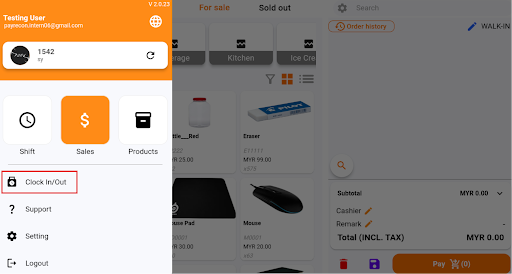
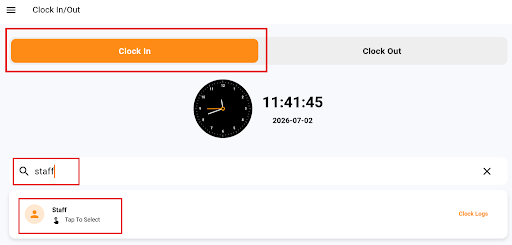
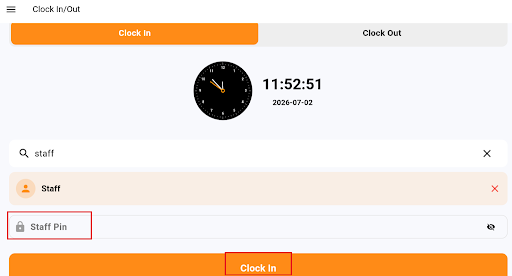
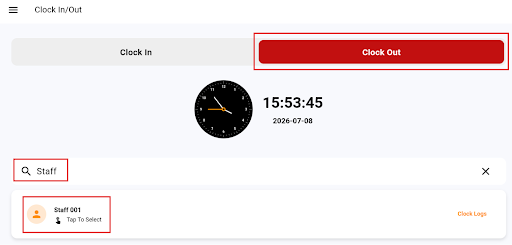
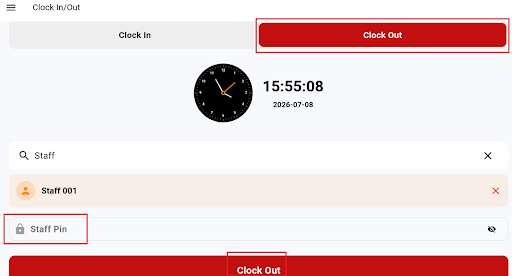
How to Clock In and Clock Out Using Smart POS App? How to Clock In and Clock Out Using Smart POS App? Step 1: How to Clock In Login to Smart POS App, Click on the three line icon on the top left of the page and Select ‘Clock In/Out’ Menu Step 2: Select the Clock In Tab, Search for the staff name and Tap on the staff record Step 3: Enter the Staff’s 4 digit PIN number and Click ‘Clock In’ button Step 4: How to Clock Out Click on the three line icon on the top left of the page and Select ‘Clock In/Out’ Menu Step 5: Select the Clock Out Tab, Search for the staff name and Tap on the staff record Step 6: Enter the Staff’s 4 digit PIN number and Click ‘Clock Out’ button